
Square Loyalty (9.0) and Loyverse (8.8) scored highest for ease at the counter, because loyalty sits inside the register. Of the tools that work next to any register, KANJIN scored highest, at 8.6.
We make KANJIN, one of the seven. So every fact about the others comes from their own help pages, and the scores came from a rubric written before anyone scored.
The scores
Higher is easier. Each line is out of 10, and the total weighs them as the rubric below says.
| Tool | Customer, repeat visit | Staff, per visit | First-time sign-up | No phone or card | Several stamps at once | Hardware and register | Total /10 |
|---|---|---|---|---|---|---|---|
| Square Loyalty | 8 | 9.5 | 9.5 | 10 | 9.5 | 5 | 9.0 |
| Loyverse (points) | 10 | 7.5 | 8.5 | 10 | 9 | 5.5 | 8.8 |
| KANJIN (ours) | 8.5 | 8 | 9.5 | 8 | 9.5 | 9 | 8.6 |
| Paper stamp card | 5.5 | 9.5 | 10 | 1.5 | 10 | 10 | 7.5 |
| Stamp Me | 6 | 5.5 | 4.5 | 8 | 8 | 8 | 6.2 |
| Boomerangme | 5.5 | 4.5 | 5* | 8 | 8 | 8.5 | 5.9 |
| Loopy Loyalty | 5.5 | 5 | 5.5 | 5* | 7.5 | 7.5 | 5.6 |
* The vendor's pages did not say. The rubric scores an unknown as 5, never higher or lower.
What happens at the counter
Each tool on a normal repeat visit, after setup, with staff signed in.
Square Loyalty (9.0)
After the sale, the loyalty screen asks the customer for their phone number. Square's help page says to "ask your customer to enter their phone number to enroll or sign in" (Square help). iPhone users can tap a loyalty pass on the display instead (Square help).
Easy: staff do nothing extra, and a customer without their phone just types the number. Points can go on by "the amount they spend, what items they purchase, or how often they visit" (Square help). Slower to start: it runs on the Square POS app, Square Terminal or Square Register, with a Square Loyalty subscription (or the Square Plus or Premium plan, which include it) (Square help).
Loyverse (8.8)
The customer does nothing, or shows a barcode card. Staff tap Add client, type the phone number, pick the customer and tap Add to ticket (Loyverse help). Points are then "automatically awarded" (Loyverse help).
Easy: nothing for the customer, and staff can find anyone "by name, email or number" (Loyverse support). Slower: those taps happen on every visit, inside the Loyverse POS app. And it gives points by spend, not stamps: 1 point per 100 currency units by default (Loyverse help).
KANJIN (8.6)
The customer scans the counter poster (the first time, they type their phone number once), says their number, or types it on an optional kiosk. Staff choose the stamps and tap Give.
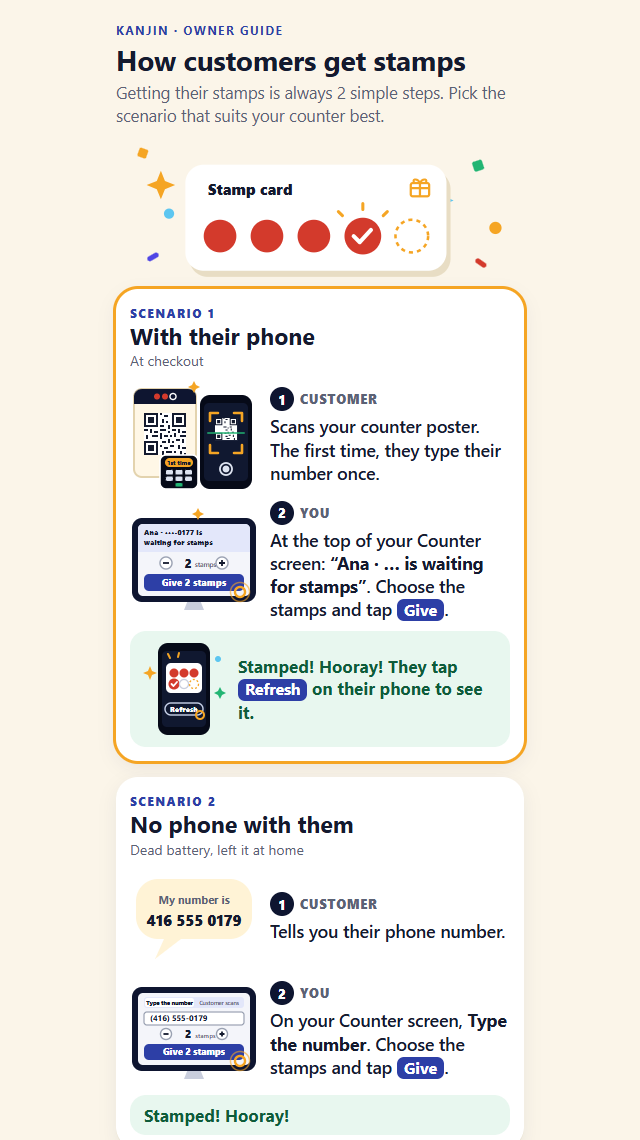
Easy: no app and no password for the customer, one field the first time, and it runs in any browser. Slower: staff use a screen next to the register, not inside it. Without a phone, staff tap Type the number and type it, which is 2 more taps than Square. And a customer who scanned taps Refresh to see the stamp. The full guide is at How customers get stamps.
Paper stamp card (7.5)
The customer hands over the card. Staff stamp or punch it and hand it back.
Easy: no sign-up and no tech, and several stamps are several punches. Slower: the customer digs the card out each time, and a forgotten or lost card means no stamp, or a fresh card.
Stamp Me (6.2)
The customer shows a code "through the native Stamp Me app, Web App or Apple Wallet and Google Wallet" (Stamp Me). Staff scan it in the Stamp Business app, tap Give Stamps, confirm the number and press Proceed (Stamp Me help).
Easy: no app download is required, and staff can look a customer up "by name, mobile number or email" in the same app. Slower: sign-up asks for a mobile number, an SMS code, a first name, a last name and an email (Stamp Me help), and staff aim a camera on each visit.
Boomerangme (5.9)
The card lives in Apple Wallet or Google Wallet. Staff open the scanner, tap Scan, set the stamps with +/-, tap Add Stamps, Add, then Done (Boomerangme docs).
Easy: the scanner installs from the browser, and it can find a customer "by Name, Phone number, Email, and Card Serial Number" (Boomerangme docs). Slower: the lowest staff score here: five taps, with a camera. Its pages did not list the default sign-up fields, so that line scored 5.
Loopy Loyalty (5.6)
The card lives in Apple Wallet or Google Wallet: "Your customers don't need to download this app" (Loopy Loyalty docs). Staff open the Stamper app, scan the card, tap + once for each stamp and tap Submit.
Easy: several stamps are just more taps on +. Slower: sign-up is a QR code, the shop's form and a wallet card (Loopy Loyalty docs). A customer without their phone is stamped from the web tool, not the Stamper app (Loopy Loyalty help).
The rubric
We judged the normal repeat visit after setup. First-time sign-up is its own line. A fact the vendor did not state scores 5.
| Line | Weight | 0 to 3 | 4 to 6 | 7 to 8 | 9 to 10 |
|---|---|---|---|---|---|
| Customer, repeat visit | 25% | open an app, log in, scan | open a wallet card or app and show a code; or dig out a paper card | one quick action: tap a reader, type a number, or scan a poster | nothing, or just say a name or number |
| Staff, per visit | 25% | back-office entry each visit | a separate scanner app: aim, set the count, confirm | 1 to 3 taps on a screen already open, no camera | nothing extra, or one stamp |
| First-time sign-up | 20% | app download, account and a code | 4 or more fields, or an SMS code, or a wallet install | 2 fields, no app, no code | none, or one field (phone number) |
| No phone or card | 15% | no way | only from a web or admin page | a quick search on the counter screen | same as the normal visit |
| Several stamps at once | 10% | 1 per visit only | an admin fix, or a setting the customer uses | a shop setting, or + taps with a confirm | 1 or 2 taps, automatic by spend, or several punches |
| Hardware and register | 5% | special hardware and a new register | the vendor's own register | a vendor app on a staff phone | any browser, or no tech |
Hardware weighs only 5%, so a shop that already runs Square or Loyverse is not marked down much for using that register.
How we scored it
- Research. Gemini drafted the research from each vendor's own help pages. A person then opened every source on 22 November 2026, kept what the pages say, fixed what they did not, and marked the gaps.
- Rubric first. The six lines, weights and anchors were fixed before any scoring.
- Two independent reviews. Two separate Gemini chats scored the same checked facts. One saw the names; the other saw only Tool A to Tool G.
- Agreement. Every line agreed within 1 point, so each published score is the average of the two, to the nearest half point.
- What the reviewers flagged. Loyverse gives points, not stamps, which helps it on the "several stamps" line. Boomerangme's sign-up fields and Loopy Loyalty's way of finding a customer were not on their pages, so both scored 5.
This scores the stamping moment only. It does not score price, rewards, emails or reports. For those, see what the loyalty add-ons cost on each POS and 8 owner jobs tested in 3 apps.
Which one fits your counter
- You already run Square or Loyverse. Its own loyalty is the smoothest, because staff stay on one screen. Loyverse gives points by spend, not stamps.
- You want to keep your register and use stamps. KANJIN runs in any browser next to any register. Customers download nothing, and a forgotten phone is handled on the same Counter screen.
- You want the card in the phone's wallet. Stamp Me, Boomerangme and Loopy Loyalty all offer wallet cards. Expect a staff scanner app and a few more sign-up steps.
- You want no tech at all. A paper card is the simplest to hand out and stamp, if you can live with lost cards.
Frequently asked questions
Which loyalty card is easiest to stamp at the counter? In our 22 November 2026 scoring, Square Loyalty (9.0 out of 10) and Loyverse (8.8) were the easiest, because loyalty sits inside the register. KANJIN (8.6) was the easiest of the tools that work next to any register.
Did KANJIN win this comparison? No. Square Loyalty and Loyverse scored higher overall. KANJIN scored highest of the tools that do not need a particular register.
Do customers need to download an app? Not on the main counter flow of any of the seven we checked. Stamp Me's tap-on-a-pod option needs its app, and Boomerangme's pages did not say.
What if a customer forgets their phone? With Square, Loyverse, KANJIN, Stamp Me and Boomerangme, staff find or type the customer on the counter screen or staff app. Loopy Loyalty uses its web tool. A paper card left at home cannot be stamped.
How were the scores made? Gemini drafted the research, and a person checked every source on the vendors' own help pages. Two separate Gemini chats then scored the checked facts on a fixed 6-line rubric, one of them blind to the names. Every line agreed within 1 point.